Tuesday, September 26, 2017

Security Fatigue

By now, most of us know that humans are the weakest link when it comes to computer security. However, the reason behind it has shifted. According to NIST, users are now experiencing what’s known as security fatigue. This means that users are feeling "weariness or reluctance to deal with computer security" (Brown, 2016).

The difference is that previously, humans were considered the weakest link due to lack of awareness or urgency, or lack of controls. In comparison to today’s standards, they are now overwhelmed with the number of passwords they must maintain, weary of complex security policies and training, and tired of just jumping through security hoops in general. The problem is that users will now find ways to either take the easiest road or circumvent security altogether, exposing them to greater risk.

The NIST provided some recommendations for easing this burden:

  • Limit the number of security decisions users need to make
  • Make it simple for users to choose the right security action
  • Design for consistent decision making whenever possible

Unfortunately, the buck doesn’t stop there. What’s even more alarming is that security fatigue has also extended to security professionals, albeit for other reasons. Studies have shown that of those who admitted to it, “10% of security professionals have quietly paid ransomware demands, and that 35% have admitted to circumventing, disabling, or otherwise bypassing their organization's security” (Vigliarolo, 2017). Security professionals are spending most of their time reacting to the constant demands resulting from the controls they have put in place, such as system notifications.

TechRepublic lists some things security professionals can do to reduce redundant tasks:

  1. Minimize security fatigue by using a single sign-on system like Okta, Shibboleth, or OneLogin
  2. Do a better job of filtering security alerts and notifications to your IT team
  3. Create an extra level of administrative privileges that lives between regular users and true admins
  4. Hold your team accountable when something happens

I can’t say I haven’t experienced security fatigue myself on both ends, though I fully understand the importance of security. I feel the answer is to implement more automated and fool-proof solutions, such as biometrics for authentication.


References

Brown, E. A. (2016, October 19). 'Security Fatigue' Can Cause Computer Users to Feel Hopeless and Act Recklessly, New Study Suggests. Retrieved May 20, 2017, from https://www.nist.gov/news-events/news/2016/10/security-fatigue-can-cause-computer-users-feel-hopeless-and-act-recklessly

Vigliarolo | May 9, 2017, 10:27 AM PST, B. (2017, May 09). Study finds cybersecurity pros are hiding breaches, bypassing protocols, and paying ransoms. Retrieved May 20, 2017, from http://www.techrepublic.com/article/study-finds-cybersecurity-pros-are-hiding-breaches-bypassing-protocols-and-paying-ransoms/

Tuesday, August 29, 2017

Cybersecurity Prediction for 2017

The Threat from Computer Hacker Groups will Increase

“Computer hacker groups will continue to emerge in developing countries around the world, increasing the threat of malicious attacks motivated by religion, politics, and money”


The prediction that the threat from computer hacker groups will increase refers to the number and strength of attacks we will see in the near future because of the growing use of the Internet in developed countries. As more people start using the Internet to feed their special interests, the hacker subculture also advances in numbers and abilities as they continue to share information, techniques, tools, and common objectives.

Pierluigi Paganini, Chief Information Security Officer at Bit4Id, has outlined his predictions in relation to cybersecurity for 2016 and 2017. All of his predictions for 2016 have been fulfilled, including Cyber espionage will be the most serious threat to governments and private businesses, stating “nation-state actors have continued to represent one of the main threats to government and private businesses. In the last twelve months, the number of cyber-attacks aiming to steal sensitive information and intellectual property continued to increase.” Nation-state actors fall into the computer hacker group category with a political motivation, as they are typically hired by their government to carry out espionage, propaganda or outright sabotage through the use of hacking techniques.

Paganini has also cast his predictions for 2017, including Nation State Actors hacking and the urgency of norms of state behavior. This prediction builds on last year’s, but surmises that the detection abilities will also increase, exposing more hacking agendas.

We will be able to watch how this prediction plays out by evaluating attacks by origin, type, and target at http://map.norsecorp.com/#/. This map is a live feed of a threat intelligence network, and while it doesn’t specifically show the motivation for the attacks, we can use the data to speculate motivations based on the current state of affairs within and between borders. 

What are your observations for 2017 so far?


References

Norse Corp. (n.d.). Norse Attack Map. Retrieved August 29, 2017, from http://map.norsecorp.com/#/  

Paganini, P. (2016, December 18). 2017 Cyber Security Predictions. Retrieved August 29, 2017, from http://resources.infosecinstitute.com/2017-cyber-security-predictions/#gref


Taylor, R. W., Fritsch, E. J., & Liederbach, J. (2015). Digital Crime and Terrorism. In Digital crime and digital terrorism (pp. 355-356). Upper Saddle River, NJ: Pearson/Prentice Hall.

Monday, May 29, 2017

CYBR 650 Week 12 – What is cybersecurity?

No automatic alt text available.


This seems a little counter intuitive, but I want to address the topic of what cybersecurity really is as my final post in this class.

When the topic of cybersecurity comes up in conversations, there tends to be some confusion as to what it entails. While knowledge about networking is crucial to be successful in cybersecurity, it is only one piece of the puzzle. 

I started the cybersecurity program with a background in information management. I chose cybersecurity because it is a specialized area of information management, and I loved working with the tools and methodologies. I have family that worked in law enforcement, so I guess you could say I am continuing the family business, albeit in a different environment. Cybersecurity professionals have different types of skill sets, just like any other field. Diversity is the key to having a successful team, and cybersecurity is no different.

As I complete the final phase of my education, I am better equipped to articulate my thoughts and proficiencies in all areas of cybersecurity. In addition to networking, this includes social engineering, computer forensics, physical security, threat modeling, risk management, disaster recovery, etc. The list is endless, and those were only the high-level takeaways. 

I am excited to go forth and make an impression in the cybersecurity field. There is so much more I would like to share, so please feel free to leave a comment anytime. I would love to hear from other cybersecurity professionals, or folks who just want to know more. 

Sunday, May 21, 2017

CYBR 650 Week 10 – Security Tools

In week two, we identified credible sources of information for our threat process model. What about tools? There are hundreds of security tools available, so how do we determine which ones to use?

Fortunately, Offensive Security developed Kali Linux in response to this need. Kali is a security distribution of Linux aimed at penetration testing, but it offers so much more. While there are too many tools to go into detail, a complete listing of tools is available at http://tools.kali.org/tools-listing under the following categories:


  • Exploitation Tools
  • Hardware Hacking
  • Forensics Tools
  • Information Gathering
  • Maintaining Access
  • Password Attacks
  • Reporting Tools
  • Reverse Engineering
  • Sniffing & Spoofing
  • Stress Testing
  • Vulnerability Analysis
  • Wireless Attacks
  • Web Applications


If you are a fan of Linux, you will not be disappointed. I had installed its predecessor BackTrack a few years ago, and have been hooked since. Which tools are your favorites? Please leave your comments below.


Sunday, May 14, 2017

CYBR 650 Week 9 – Action Plan

As we progress through our threat models with the corresponding assignments, I have come to realize that we are only scratching the surface of threat modeling. The Harry and Mae's case study has so many unknown variables that would normally be addressed in a real environment, and consequently gets left out of the assignments. Some of the known variables are generic descriptions, and we have to make assumptions in order to give a proper analysis.

In any case, I feel threat modeling requires much more time to solicit information, document the environment, investigate specific threats and vulnerabilities, calculate the risks, provide more detailed recommendations, and identify metrics for defining success. As students (most of us with full-time jobs), we have limited time to completely cover all aspects, and I have noticed some scope shrinkage in order to demonstrate that we understand the basic concept of the assignments.

It seems that a comprehensive threat analysis would require a diverse team of security consultants working with the in-house network engineers, system admins, and project managers over a span of weeks to encompass everything that would benefit from a security makeover. As a result, I have a much deeper appreciation for the opportunity to learn this process, and for the experts who carry this out on a daily basis.

Sunday, April 30, 2017

CYBR 650 Week 7 – Threat Analysis

This week has been a bit of a challenge in class, as we apply our threat models to a case study. So far, we have created our own threat process models, identified credible sources to stay current, and analyzed the fictitious system in the case study.

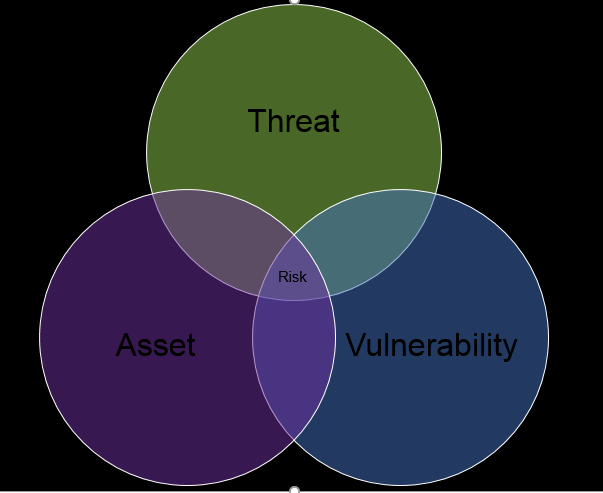
Now we are in the threat analysis stage, which means that we have to use the resources we identified earlier in the process to enumerate the business assets, their vulnerabilities, the imposing threats and threat types, and assess the risk to the environment. While there are many ways to demonstrate the relationship between all four elements, a simple Venn diagram seems to illustrate this nicely:


While this assignment proved to be a lot of work researching the material, it was also probably the most rewarding. I was very impressed by the pot of gold I found in NIST's National Vulnerability Database by using just a few keywords that applied to the case study. However, this is only a repository for hardware, firmware, or software weaknesses. Since processes are usually unique to an organization, finding process vulnerabilities will require a supplemental assessment. 

Saturday, April 22, 2017

CYBR 650 Week 6 – Women in IT Security


This week I had the privilege of attending the annual ICAN Women's Leadership Conference. The theme this year focused on women balancing work and life, which has been a decades-long struggle while we are still trying to break out of traditional gender roles.

Michael Kimmel, Professor of Sociology & Gender Studies at Stony Brook University, gave one of the most interesting key note presentations on the main stage: The Gendered Society. He stated, "Research by Catalyst and others has shown conclusively that the more gender-equal companies are, the better it is for workers, the happier their labor force is. They have lower job turnover. They have lower levels of attrition. They have an easier time recruiting. They have higher rates of retention, higher job satisfaction, higher rates of productivity."

What does this mean for cybersecurity? Kimmel pondered why there are so few women at the top of STEM careers. His theory is that due to the expectations placed on women within the home, many women are simply unable or unwilling to dedicate the time and effort it takes to advance in a male dominated field. The statistics for women in cybersecurity are staggering:


So what needs to be done to level the playing field? Please leave your comments below.

You can also watch one of Professor Kimmel's recent presentations at: https://www.ted.com/talks/michael_kimmel_why_gender_equality_is_good_for_everyone_men_included

Friday, April 14, 2017

CYBR 650 Week 5 - TechJunction 2016


I recently had the opportunity to be on the advisory committee for TechJuncion 2016, a technology conference geared towards security and server management. It is hosted annually right here in the heartland of America, and the best part is that it's free to attend! Here are some of the highlights:

Passwords Suck: A Platform Approach To Securing Enterprise Identities 
Presented by: Centrify

This presentation advocated single sign-on software. Statistics for password theft show that 63% of breaches were due to compromised accounts.

Ransomware: All Locked Up With No Place To Go 
Presented by: Kaspersky Lab

Kaspersky Labs outlined how businesses can protect themselves against ransomware through backups, updates, and anti-virus programs. Kaspersky offers System Watcher and Automatic Exploit Prevention as security tools to prevent against ransomware. Current statistics of ransomware are available in Verizon'€™s 2016 Data Breach Investigations Report - see below for the link.

Defending Against Modern Malware
Presented by: WatchGuard Technologies, Inc.

WatchGuard delivered a sobering speech about modern malware. They stated that modern malware is moving from signatures to binary patterns. For example, ransomware uses bitcoins for payment, and is almost impossible to track. They also identified three different cyber attacker profiles: Hacktivist, Cyber Criminal, and Nation State. The good news is there are websites that monitor attacks and breaches (see Other Websites section below), and WatchGuard has designed a solution to break the Cyber Kill Chain (see their PDF presentation below).

Why Do You Need DR? 
Presented by: Zerto, Inc.

Zerto started the presentation by pointing out that disasters are both natural and operational. Disaster recovery planning should include backup, redundancy, impact/urgency considerations, and should turn a disaster into a non-event.

Innovation Matters 
Presented by: SimpliVity

Simplivity defined innovation as a means to improve on a service based on current needs. They used Netflix as an example of how they capitalized on Blockbuster's current movie rental service by catering to current and future business trends, and changing the way the service is delivered.

Hyperconvergence is today's way of innovating by combining several functions into one delivery method. An example of hyperconvergence is how phones evolved from just a device to make calls, to smart phones, which can browse the web, track fitness goals, display the current weather, and so much more. Hyperconvergence allows us to virtualize server, data, network resources to optimize delivery and reduce duplication.

Keynote Presentation: Surviving Security Groundhog Day 
Presented by Ron Woerner • Director & Professor, Cybersecurity Studies at Bellevue University 

This speaker deserves special accolades, as he has been the driving force behind my pursuit of a Master's degree in Cybersecurity. Prof. Woerner indicated that technology has advanced to IoT (Internet of Things), but security isn't getting any better. Humans are still the weakest link, and complacency is a big culprit. He reassured the attendees that security never has to be 100%, just good enough, but you need to have an iron-clad contract for cloud services to be secure. His motto: If you SEE something, SAY something!

Thanks for all you do, Coach.


Resources 

Verizon 2016 Data Breach Investigations Report
http://www.verizonenterprise.com/verizon-insights-lab/dbir/2016/ 

IT Policy Compliance for Dummies
https://www.qualys.com/dummy-pc 

PCI Compliance for Dummies
https://www.qualys.com/dummy-pci 

Web Application Security for Dummies
https://www.qualys.com/dummy-was 

Vulnerability Management for Dummies
https://www.qu alys.com/dummy-vm

Other Websites: 

Data Visualizations (Ex: data breaches)
http://www.informationisbeautiful.net/ 

Malc0de Database - an updated database of domains hosting malicious executables
http://malc0de.com/database/ 

Norse - an interactive map of attacks
http://map.norsecorp.com/ 

WatchGuard Presentation
http://schd.ws/hosted_files/trivalentgroupsolutionsexpo2015/5b/WatchGuard-%20Defending%20against%20Modern%20Day%20Malware.pdf 

Sunday, April 9, 2017

CYBR 650 Week 4 - Attack Trees

Attack Trees

Attack trees appeared in the 1990's as an attacker-centric approach to analyze the security of systems. Usually displayed as a Visio flow chart, it diagrams possible attacks against an object. The parent node represents the goal, while child nodes break out the various methods to achieve the goal, as illustrated in this example:


Introduced by Bruce Schneier, attack trees can also assign values, such as difficulty, cost, intrusiveness, legality, or just about any other metric that might tell a security story. For example, if the method to achieve the goal costs more than the goal itself, the probability of the attack is less likely. Security teams can use this information to make recommendations and implement controls as necessary.

This type of threat modeling may seem time-consuming and rebellious to the software-centric approach to the Microsoft's Security Development Lifecycle, but it has some versatility. Once the attack tree is fully grown, it can be linked to other trees so analysts or developers can see the forest. And according to Schneier, “If you're a computer-security expert, you don't have to know the details about how difficult a particular model of safe is to crack; you just need to know the values of the root node.” 

What do you think? Is this approach outdated or still useful? Please post your comments below.


Reference

Schneier, B. (1999, December 1). Attack Trees. Retrieved April 09, 2017, from http://www.drdobbs.com/attack-trees/184411129

Monday, March 20, 2017

CYBR 650 Week 2 - Credible Sources for Information Security

With any type of research, it is critical to have references in your arsenal to ensure the information is complete, accurate, and comes from a reputable source. Threat modeling is no different, and some of my favorites for reporting on threats, vulnerabilities, updates, and security news are listed below:

  1. SOPHOS’ nakedsecurity - http://nakedsecurity.sophos.com/ - I use this site a lot because it covers security for a variety of platforms, most notably Macs. I am a Mac user myself, and it is beneficial to have someone on the IT staff that can provide expertise in this area. Despite popular belief, Apple products are not immune to attacks, and this is one website that delivers great information for securing Apple devices. They also provide a section that focuses on vulnerabilities in general at http://nakedsecurity.sophos.com/category/security-threats/vulnerability/.
  2. TechTarget’s SearchSecurity - http://searchsecurity.techtarget.com/resources#parentTopic4 - Tech Target is a great news source for any topic related to IT, but SearchSecurity also includes an area specially designed for information security threats. It covers several types of threats, hacking tools and techniques, security awareness training, and more.
  3. SANS @Risk: The Consensus Security Alert - http://www.sans.org/newsletters/risk/ - This newsletter gives a synopsis of the top vulnerabilities each week, with a complete listing of all new vulnerabilities. While anyone can just browse the archives, subscribers also receive SANS Flash Alerts several times per year.
  4. Forbes - http://www.forbes.com/security/ - Forbes is not just a financial resource anymore. It has expanded its horizons to encompass technology. Security is listed as a sub-topic under technology, and the authors do a great job of keeping up with current security trends.
  5. NIST’s National Vulnerability Database - http://nvd.nist.gov/ - Last but not least, this website hosts the Vulnerability Search Engine to query common configuration enumeration (CCE) or common vulnerabilities and exposures (CVE) for any type of software contained in the database. It also has a repository of security checklists based on accepted standards for organizations to use as a benchmark for securing their own systems.


Additionally, CSO Online provides a one-stop-shop dashboard of valuable security tools and information, located at http://www.csoonline.com/article/2926005/techology-business/cso-online-daily-dashboard.html.

While all of these sources have a proven track record for reliability and trustworthiness, experts are not always going to agree. One course of action is to go with the majority for any conflicting information. More knowledgeable individuals can go a step further and use these resources to develop their own analysis.

Sunday, March 19, 2017

CYBR 650 Week 1 - Introduction

Welcome back! For my final class in the Master of Cybersecurity program, our task is to create our own threat process model using Visio to map it out. This blog will follow my efforts.

During some basic research on this topic, I came across Microsoft's SDL Threat Modeling Tool. It requires Visio to run, and it aids in analyzing threats for this particular endeavor. Since I need to have Visio installed anyway, and the SDL Threat Modeling Tool is free, my goal is to incorporate it into the assignments and post evaluations of the tool along the way.

For more information on how to use the SDL Threat Modeling tool, visit:
https://www.youtube.com/watch?v=iV2SAuTxIUc

To download this tool, visit:
https://www.microsoft.com/en-us/download/details.aspx?id=49168


Friday, July 27, 2012

The Risks of B.Y.O.D.

A new trend has been slowly emerging with the increased prevalence of smartphones and tablets in the market. Not only do they have enormous benefits for the corporate environment, but it has become a staple for every household. As employees become accustomed to their own personal brand, they have adopted an expectancy to sync their devices with the corporate network in order to avoid juggling two separate devices. The practice of Bring Your Own Device (B.Y.O.D.) does bring additional benefits to the organization, but not without security risks.

Cisco Systems issued a survey that asked participants whether their employer allowed personal devices in the workplace, and 95% responded positively (Burt, 2012). Unfortunately, it also poses more challenges for IT. Administrators would have more devices to support, which means more devices that they have to research for vulnerabilities and find ways to mitigate the likelihood and severity of threats for any corporate information stored, processed, or transmitted on the personal device.

The good news is that there are a few solutions to ease the burden. One is to install a virtual machine on each device, where the user would have separate personal and corporate computing mechanisms. They could securely connect to the corporate network, where the administrators would have more direct control, such as forced encryption and password complexity. (Trumbo, 2012)

Mobilisafe also offers a commercial product known as Mobile Risk Management to aid administrators in their quest to align business strategy with IT objectives. According to Mobilisafe’s CEO Giri Sreenivas, the cloud-based solution “gives administrators real-time visibility of all such devices connecting to the network and assesses the risks involved with each one, from the level of security on the devices to whether the firmware has been upgraded to whether applications on them are malware or spyware.” (Burt, 2012) Where one technology digs a security hole, another is within reach to fill it.


References:

Burt, J. (2012, June 6). Mobilisafe Cloud Solution Assesses BYOD Risks to Businesses - Enterprise Networking - News & Reviews - eWeek.com. Technology News, Tech Product Reviews, Research and Enterprise Analysis - News & Reviews - eWeek.com. Retrieved July 27, 2012, from http://www.eweek.com/c/a/Enterprise-Networking/Mobilisafe-Cloud-Solution-Assess-BYOD-Risks-to-Businesses-194734/ 

Trumbo, J. (2012, March 16). What Can Be Done About Personal Devices In The Workplace?. Cloud File Security. Retrieved July 27, 2012, from cloudfilesecurity.biz/2012/03/16/what-can-be-done-about-personal-devices-in-the-workplace/

Monday, November 14, 2011

Double Columnar Cipher Challenge


As one of my cybersecurity classes comes to an end, this will be my final blog. Most of my postings have covered Mac OS X security configurations or cryptology, both subjects being a great interest of mine. Other topics, such as National Cyber Security Awareness Month, just happened to coincide with the area I was studying. The Mac OS X source was myself, playing around with the features on my own Macbook. I incorporated other sources into the postings where applicable, and tried to use a variety.

I hope this blog will be useful to other students and security professionals by providing a clear understanding of the chosen topics and resources for more information.

Since the holidays are just around the corner, I thought I would put a little cheer in this finale. Not only will you learn how a double columnar cipher works, but I challenge you to crack my own code!

The first step is to pick two code words or phrases of the same length, and put each letter in its own column. Letter by letter, write out your message under the first code word/phrase, like this:

R E D M U S T A N G
D O N T F O R G E T
T O D R I N K Y O U
R O V A L T I N E R
A L P H I E X X X X

In this example, the first code phrase is RED MUSTANG, and the message is DON’T FORGET TO DRINK YOUR OVALTINE RALPHIE. The message is not long enough to cover all the cells, so X’s are used for padding.

Next, order the code word/phrase according to the alphabet – 1 for A, and so on. If you have duplicate letters, I suggest numbering them in the order of appearance in the code word/phrase. It should look like this:

7 3 2 5 10 8 9 1 6 4
R E D M U S T A N G
D O N T F O R G E T
T O D R I N K Y O U
R O V A L T I N E R
A L P H I E X X X X

Starting with the column under #1, string the message into blocks of 5 letters, continuing on to the next number if needed (do not count the code word/phrase, just the message). This makes the first ciphertext, which is GYNXN DVPOO OLTUR XTRAH EOEXD TRAON TERKI XFILI.

The first ciphertext is used to fill the cells under the next code word, NIGHT MOVES:

6 4 2 3 9 5 7 10 1 8
N I G H T M O V E S
G Y N X N D V P O O
O L T U R X T R A H
E O E X D T R A O N
T E R K I X F I L I

To generate the final ciphertext, perform the same operation in the example above, with letters in blocks of 5: OAOLN TERXU XKYLO EDXTX GOETV TRFOH NINRD IPRAI. To decrypt, the operation is performed backwards, starting with this final ciphertext. If you know the code word/phrase, start by ordering the letters into numbers and place the first block of 5 letters into column #1, moving on to the next column. Once you have the cells filled in, do the same using the first code word/phrase.

Now that you have learned how to compose a double columnar cipher, I have two code phrases for you. The first is APPLE CIDER, and the second is SANTA CLAUS. The final ciphertext is NSAPO VHAAE AHFYA IEDHP YAANS ODSEL.

Happy Holidays!

Friday, November 11, 2011

Kids and Information Security

When most people think about protecting their kids, its usually from bullies on the playground, accidents, and illness. In the past few decades, it extended to censoring their exposure to graphic media such as TV, movies, and music. In today's world, kids are very technology-savvy, yet they know little about the consequences of using it inappropriately. That's where we need to step up as parents and offer our guidance, establish rules, and enforce our restrictions.

When it comes to kids, I feel that some level of censorship should be implemented, depending on their age level. As they get older, it will be increasingly difficult to shield them from every danger, so it is our job to talk to them about what they might encounter, and how to handle it. Why should information security be any different? With the increasing prevalence of online predators, cyberbullies, and malicious content disguised as legitimate offers, your kids and devices are at stake.

At the same time, we all know that kids do the exact opposite of what we want them to do, so some controls will help keep them on track. Installing a pop-up blocker or web filter on your browser is an obvious choice, but if you have read my previous blogs, you know that I advocate features built in to Mac OS X. One feature that addresses this topic is the Parental Controls under Accounts in System Preferences:


With this feature, you can manage areas such as System, Content, Mail & iChat, Time Limits, and Logs:


This example uses the default guest account, but you can set up several accounts and tweak the controls to suit the level of permission for each. Not only does this protect your children from the evil forces that be, but it also prevents other users from accessing sensitive information or modifying controls set by the administrator.

While this is a great way to keep tabs on what your kids are involved in, they still need to know the rules set by your family. Do they know what your expectations are and the risks of deviating from those expectations? Do they know what dangers to look for and how to avoid them? Keeping your kids educated is the best prevention. You will not be able to hold their hand forever.

Saturday, November 5, 2011

Firewall for OSX Leopard (10.5)

How many of you knew that a Macbook comes with a built-in firewall? Well, it does, and now is the time to take advantage of it.

To configure this firewall, you will need to open System Preferences and click on the Security icon. The Security menu has three tabs: General, FileVault, and Firewall. Select the Firewall tab, which should look like this:


Three radio buttons appear in the box:

•Allow all incoming connections stops the firewall from running
•Allow only essential services blocks any service from making a connection
•Set access for specific services and applications allows the user to set permissions for trusted connections

The last one is probably the best choice for an average user. The + and - box will let you choose which applications are allowed to make connections. Once you activate the firewall, the Advanced button becomes available. Clicking on it will bring up a submenu:


I recommend checking both Enable Firewall Logging and Enable Stealth Mode. A great way to see if the Enable Stealth Mode option is working is to visit the ShieldsUP! website. From the Home page, click on the Proceed button, and choose All Service Ports. A quick run of my ports aced the test:


This configuration should be done with administrator privileges to avoid any changes being made, and don't forget to click the Lock icon when you are done!


*Answers to last week’s quiz:
1)d 2)b 3)c 4)d 5)b

Tuesday, October 25, 2011

Take the quiz: Information Security in the Media

Information security is not a new trend. It has masqueraded for ages as a form of entertainment. In celebration of National Cyber Security Awareness Month, I have dug up some fun facts for your own amusement. Go ahead and test your knowledge!


1. Which famous author used a polyphonic substitution cipher in one of his or her short stories?

a. Edgar Allen Poe
b. Washington Irving
c. Stephen King
d. Virginia Woolf


2. What type of cipher did Ralphie use on his Code-O-Graph in A Christmas Story?

a. Transposition cipher
b. Simple cipher
c. Block cipher
d. Stream cipher


3. In 2001, a movie about hackers gaining access to a government slush fund in a counter-terrorism scheme hit the box office. The movie was named for a famously used password. What is the name of the movie/password?

a. Antitrust
b. Hackers
c. Swordfish
d. Takedown


4. Who was the famous hacker that went by the code name c0mrade?

a. Kevin Mitnick
b. Adrian Lamo
c. Kevin Poulsen
d. Jonathan James


5. What breakfast cereal contributed to the popularity of phone phreaking in the 1990’s because the toy whistle inside the box was tuned to the frequency of most AT&T phones?

a. Fruity Pebbles
b. Cap’n Crunch
c. Golden Grahams
d. Frosted Flakes


*Answers will appear in next week’s blog. Happy hunting!

Thursday, October 20, 2011

National Cyber Security Awareness Month


October 2011 has been designated as the National Cyber Security Awareness Month (NCSAM) for the eighth year running. It is a cooperative effort between the Department of Homeland Security (DHS), the National Cyber Security Alliance (NCSA), and the Multi-State Information Sharing and Analysis Center (MS-ISAC). Their goal is to promote cyber safety by providing education and awareness to both public and private sectors.

So how can you get involved? NCSAM's motto is "Our Shared Responsibility", which means cyber security starts with you by protecting your own information. Google has started a "Good to Know" campaign that outlines a few simple steps you can take to create a strong defense. The campaign addresses many aspects of information security, such as phishing, malware, and mobile security. Check it out at Google's Good to Know campaign.

Another ongoing campaign that is more widely known is Stay Safe Online. It is a great resource center for a variety of communities, from educational institutions and law enforcement to businesses and individuals. If you have kids, you will definitely want to visit the cyberbullying page.

If you find yourself or someone you love a victim of any kind of security breach or harrassment, please don't hesitate to report it. While local law enforcement may be the obvious choice, a little-known reporting agency is the Internet Crime Complaint Center. The website is ran by the Federal Bureau of Investigations (FBI) and the National White Collar Crime Center (NW3C). It is specifically geared towards cyber crime, and may be better equipped to handle these sensitive situations.

October may be coming to an end, but cyber security is a year-round battle. Be ready for your attackers.

Wednesday, October 12, 2011

An Overview on Virtualization


How does virtualization work?
Virtualization is the practice of using software on a host computer to simulate a particular computing environment. It works by allowing processes to share system (particularly hardware) resources.
Three main types of virtualization are network, storage, and server. Network virtualization works by splitting bandwidth into channels. Storage virtualization combines physical storage from multiple sources into a centralized source. (What is Virtualization?, n.d.) Sever virtualization disguises the number and components of real servers from guest users by dividing and isolating virtual servers. (What is Server Virtualization?, n.d.)
All three types assign resources as needed rather than committing it to a particular device. The purpose is to free up available components while reducing costs.

What can virtualization be used for?
Virtualization is used for private cloud computing within a network. When a private network is joined to a public one, it creates a hybrid cloud. This method allows businesses to join forces, or for one business to manage internal and external data.
Virtualization on a private level can be used for running multiple operating systems on a single computer. One such method employs Parallels software. (Virtualization & Automation Solutions for Desktops, Servers, Hosting, SaaS – Parallels Optimized Computing, n.d.) Parallels is an application that allows a user to toggle between Windows and OSX (for example) without partitioning the hard drive. The Windows portion would be the virtual machine, sharing resources with OSX on the Macbook hard drive.

What are the security flaws?
Security flaws depend on the management of server configuration and operating system patching. If neither is actively maintained, it leaves a gap for attackers to plunge through. Active maintenance includes patching the hypervisor, following best practices in configuring the host/platform, securing transmissions, managing virtual switches for guests, and preventing malicious activity from the guest.
The best advice is to develop strong policies and procedures, follow best practices, and harden systems. (Shackleford, 2010)


Why is this issue becoming prevalent?
Virtualization is a growing industry because it provides businesses with a solution to consolidate resources; cut costs on hardware, maintenance, and personnel; plan seamless backup and routine maintenance; improve operational flexibility, and securely manage desktop environments.


References:
1.     "Virtualization & Automation Solutions for Desktops, Servers, Hosting, SaaS – Parallels Optimized Computing." Virtualization & Automation Solutions for Desktops, Servers, Hosting, SaaS – Parallels Optimized Computing. N.p., n.d. Web. 21 Dec. 2010. <http://www.parallels.com/>.
2.     Assessments, Dave Shackleford - Director of Security, SANS - Tuesday, and 9 March 2010.. "An introduction to virtualization security." Help Net Security. N.p., n.d. Web. 21 Dec. 2010. <http://www.net-security.org/article.php?id=1397&p=1>.
3.     " What is server virtualization? - Definition from Whatis.com ." Server Virtualization: Covering today's Server Virtualization topics . N.p., n.d. Web. 21 Dec. 2010. <http://searchservervirtualization.techtarget.com/sDefinition/0,,sid94_gci1032820,00.html>.
4.     " What is virtualization? - Definition from Whatis.com ." Server Virtualization: Covering today's Server Virtualization topics . N.p., n.d. Web. 21 Dec. 2010. <http://searchservervirtualization.techtarget.com/sDefinition/0,,sid94_gci499539,00.html>.

Saturday, October 8, 2011

What is a Buffer Overflow?


A buffer is a temporary data storage area that has a capacity limit. A person running several programs at one time needs the buffer zone to seamlessly process information before heading to its final storage area.
A buffer overflow happens when a program or process tries to store more data than the buffer can hold. The extra data is forced into other buffer zones, possibly corrupting the data already in there. Sometimes the buffer overflow is done intentionally, as in an attack. The buffer overflow works on the “last in, first out (LIFO) principle. The last string of data is the first string to be cut from the buffer and go into overflow. An example is below:


In this example, the program was written to accept 5 bytes in the “name” field. The buffer (small) can only hold two, moving the remaining 3 into the executable stack. Hackers take advantage of this by purposefully inserting malicious code at the end that they know will go into overflow. However, this is not always the case. Sometimes the C/C++ programming language often has errors caused by the limitations of the programmer. (Information Security, n..d.)
Fortunately, there are security features out there to detect and prevent this, such as Comodo Memory Firewall. (TechMixer, n.d.)
References:
1.     " What is buffer overflow? - Definition from Whatis.com ." Information Security: Covering today's security topics . N.p., n.d. Web. 19 Dec. 2010. <http://searchsecurity.techtarget.com/sDefinition/0,,sid14_gci549024,00.html>.
2.     " Prevent Buffer Overflow Attack with Comodo Memory Firewall." TechMixer | Review Software, Online services, Freeware and Others.. N.p., n.d. Web. 19 Dec. 2010. <http://www.techmixer.com/prevent-buffer-overflow-attack-with-comodo-memory-firewall/>.

Saturday, October 1, 2011

Protecting Folders on Mac OSX


Almost anyone concerned with securing their information is familiar with how to protect important documents, such as the "protect workbook" option built into Microsoft Excel. What happens when you want to protect the entire folder, and it is stored on a Mac? I can show you how in a few simple steps.
1.     Open Disk Utility, found in the Applications folder under “Utilities”
2.     Choose “New” from the File drop-down menu, and then “Disk Image from Folder” from the sub-menu
3.     Browse to where your folder is located, select it, and click “Image”
From here, a new window entitled “New Image from Folder" will pop up, like this:

4.     Choose read/write from the Image format drop-down menu if you want to be able to modify its contents later. Otherwise, compressed is fine. Also, you may choose to encrypt the folder. I recommend 128-bit AES encryption. Save this.
The Disk Utility will now create a disk image (.dmg) file on your desktop. It will prompt you to create a password, and by default will have the “Remember password in my keychain” box checked. This defeats the purpose of securing the folder, so I recommend unchecking it. If you click on the disk image to open it after saving the password in your keychain, it will display the contents without asking for a password.


5.     Click on “Ok”, and you now have a encrypted, password protected folder!
*On a final note, you may delete the original folder for security purposes. However, do so at your own risk.  Your keychain is not storing the password, so you must take care to remember it. The .dmg file may also become corrupted, with no access to the folder you wanted to secure. As mentioned in earlier posts, always back-up your information with a separate device or service!